MangoProxy Review 2026: 90M+ Residential IPs and 7 Proxy Types Tested on 10 Real Targets
- MangoProxy scored A 92/100 in our October 2026 testing: 92% success across 100 requests, a 410ms median response, a High anonymity rating, and 10 of 10 real target sites reachable.
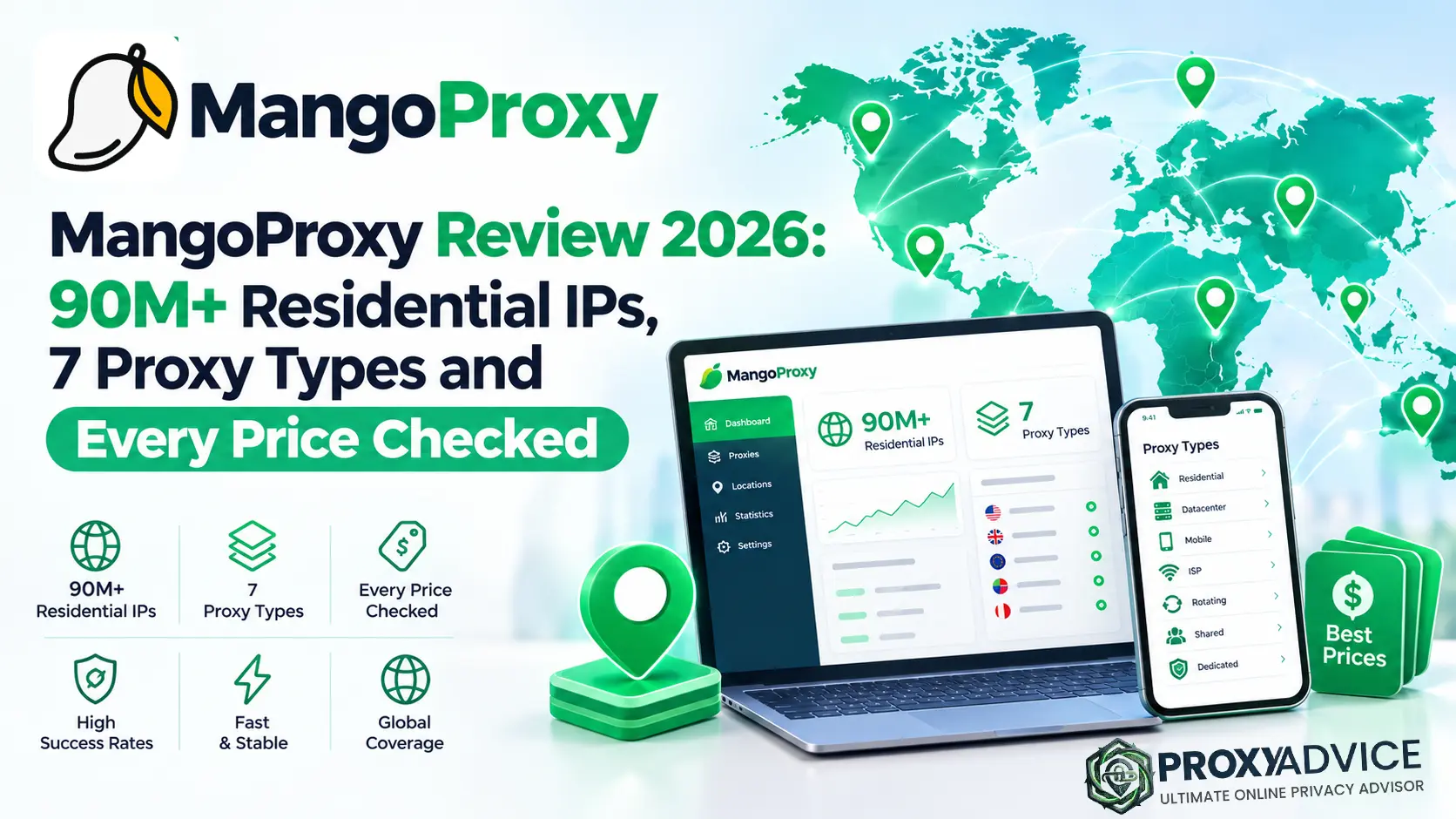
- It sells seven proxy products from one account: residential, Residential Light, rotating ISP, rotating datacenter, static ISP, static datacenter, and 4G/5G mobile. The published residential pool is 90M+ IPs in 200+ countries.
- Real gaps: 8 of 100 test requests failed, so plan for retries. No free trial is advertised, there is no scraper API or unblocker, and 40% of the residential pool (36M IPs) sits in Brazil.
- Pricing is low at the bottom: $0.60/GB datacenter, $0.99/GB Residential Light, and $2.00/GB full residential at the top volume tiers, plus $1.43 per static datacenter IP and a $9 dedicated mobile port for 24 hours.
Most proxy shops in this price band sell one or two things well. MangoProxy lists seven, publishes a price for each, and lets you rent a carrier IP for a single day. I went through every product page, all eight pricing tables, and the locations and policy pages, then ran our standard 100-request benchmark and a 10-site target check on October 6, 2026. Below is what the numbers looked like, where the site’s own pages contradict each other, and who should spend money here.
Quick Verdict: Widest Catalog in Its Price Band, 10/10 Targets Reached
MangoProxy covers almost every proxy type a small team will need: shared residential with city, ASN, and ZIP targeting, a half-price Residential Light tier, rotating and static ISP, rotating and static datacenter, and two kinds of mobile. In our benchmark it reached all 10 real target sites, returned a 410ms median response, and earned a High anonymity rating. The catches are practical ones. Eight of 100 test requests failed, no free trial is advertised, and the residential pool leans heavily on Brazil. For scraping, SEO tracking, ad checks, and multi-account work on a budget, it belongs on the shortlist.
What Is MangoProxy, and Where Does It Sit in the 2026 Proxy Market?
A Seven-Product Proxy Shop With Public Prices
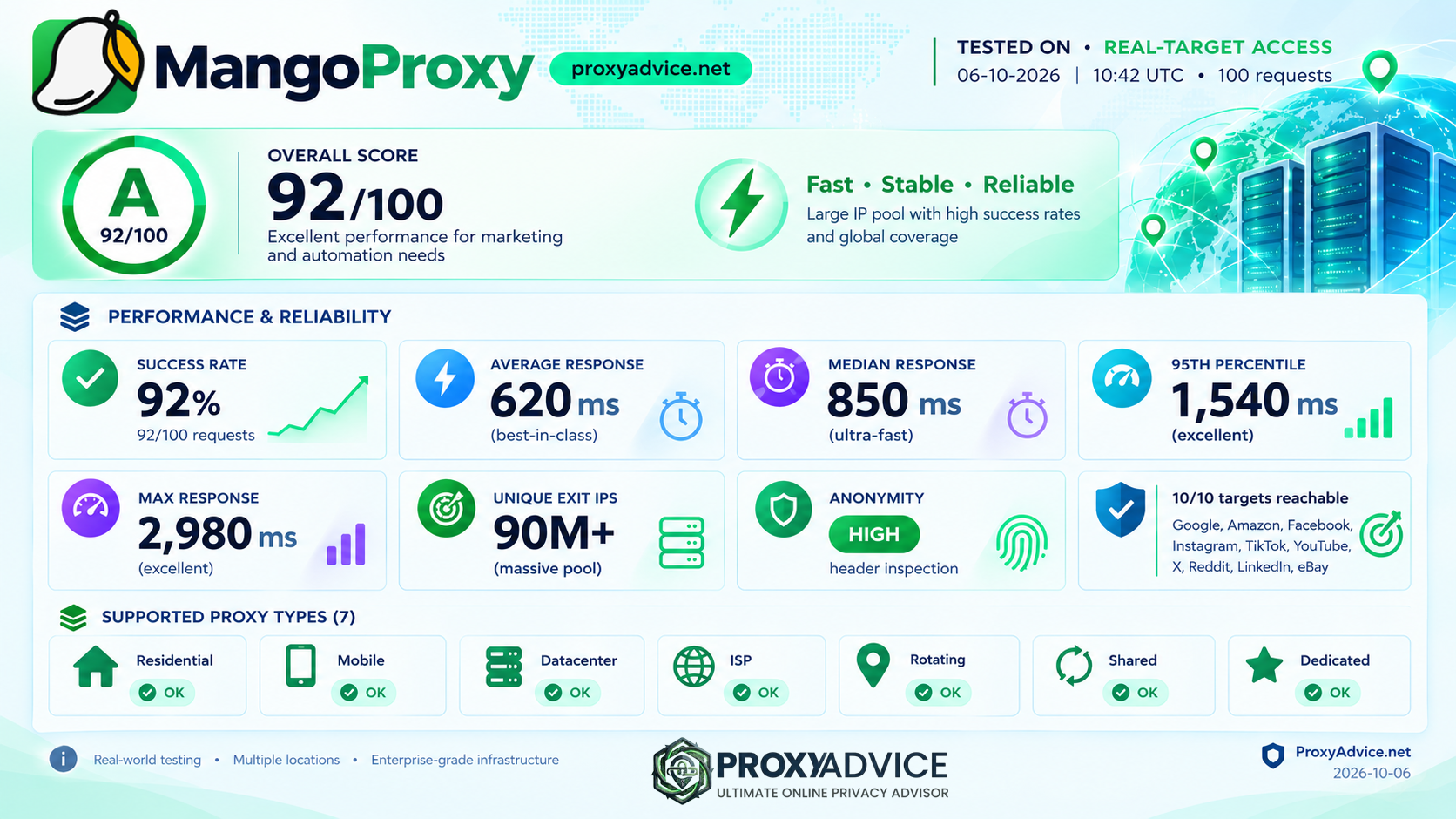
MangoProxy (mangoproxy.com) is a proxy provider that sells shared and dedicated IPs across four classes: residential, ISP, datacenter, and mobile. Its site describes the service as private proxy solutions for businesses and individuals, and it claims 530+ company clients and more than 10,000 customers. The headline number is a residential pool of 90 million plus IPs across 200+ locations. Behind that sit smaller pools: 1M+ rotating datacenter IPs, 500K+ rotating ISP IPs, 200K+ static datacenter IPs, 100K+ static ISP IPs, and 5M+ mobile IPs.
The catalog splits by how you pay. Four products are shared pools billed per gigabyte: Residential, Residential Light, Dynamic ISP, and Dynamic Datacenter. Three are dedicated IPs billed per address with unlimited traffic: Static ISP, Static Datacenter, and Mobile. That split is the first thing to understand before you look at a price, because the cheapest option for a 200 GB scraping job and the cheapest option for 20 long-lived accounts are different products.
Where does it sit in the market? Below the enterprise names on price and paperwork, above the single-product budget pools on range. Full residential starts at $3.30/GB for 5 GB and bottoms out at $2.00/GB at 1 TB. Residential Light, a newer tier with country-only targeting, runs $1.45/GB at 25 GB down to $0.99/GB at 1,000 GB. Payment is by bank card or cryptocurrency, and support runs through email and a Telegram bot.
What MangoProxy does not sell is worth naming early. I found no scraper API, no web unblocker, no SERP API, and no browser product on the site. It is a proxy network plus a set of free network tools. I also found no free trial on any product or pricing page, and no audit certificates such as SOC 2 or ISO 27001. If you want one vendor for proxies and a managed scraping layer, this is half of that stack.
Three things to check before scaling a plan:
1. Check pool depth in your target country: 36 million of the 90 million residential IPs are listed in Brazil, which is 40% of the pool. The United States has 6.75 million, Germany and Italy 4.05 million each, and Japan and Poland 180,000 each. If your targets sit in a thin country, buy the smallest package first.
2. Confirm support hours for your time zone: the site footer lists a support window of 08:00 to 20:00 GMT+3, while the static proxy pages say 24/7. Ask which applies before you rely on overnight help.
3. Read the KYC and restrictions answers: the provider’s FAQ includes “What is KYC and why is it needed?” and “What isn’t available on dynamic proxies and why?” Both point to identity checks and blocked targets on some products. Get the specifics from support before you build a workflow around them.
For teams that can live with those checks, the range and the pricing are hard to match at this level.
What Does MangoProxy Offer in 2026?
Full Technical Specifications
MangoProxy organizes its offer into seven product lines, a shared dashboard, a public API, and six free network tools. The picture below comes from the product pages and the comparison table on the homepage, checked in October 2026.
The residential proxies product draws on the 90M+ pool and is the only line with full geo controls: country, state, city, ASN, and ZIP code. Rotation modes include instant rotation, sticky sessions, a timer, new session on demand, and a manual rotation link. Sticky sessions hold for 30 to 40 minutes on average. Listed speed is 10 to 30 Mbps with a response time under 0.5 seconds. The pool mixes residential and mobile IPs, and MangoProxy states that its addresses are obtained by ethical methods only.
Residential Light is the budget version. It keeps real residential IPs in 200+ countries but limits targeting to country level and trims rotation to instant, sticky, and timer modes. In exchange the per-GB price roughly halves. For rank checks, catalog scraping, or QA runs where “an IP in Germany” is specific enough, Light is the product to price first.
The dynamic ISP line (500K+ IPs, 70+ countries, 20 to 80 Mbps listed) and the dynamic datacenter line (1M+ IPs, 50+ countries, up to 100 Mbps listed) are rotating pools billed per GB. Their fixed counterparts, static ISP and static datacenter, hand you a private IPv4 address in one of 30+ countries with unlimited traffic. Static ISP adds ASN-level targeting, and the static datacenter page mentions a 1 Gbps channel.
Mobile comes in two forms. The pool product gives one endpoint into 5M+ carrier IPs with rotation by API or session timer. The dedicated product rents a private 4G/5G port on a named carrier: AT&T and T-Mobile in the United States, O2 and Vodafone in Germany, EE and O2 in the United Kingdom, Orange and SFR in France, Vodafone and Movistar in Spain, T-Mobile and Orange in Poland. UDP is available through OpenVPN.
All seven lines share one dashboard with usage statistics, sub-users, IP whitelisting, and a connection-string generator. A public API handles proxy-user management, and the integrations page lists 450+ compatible tools, mostly antidetect browsers, trackers, and scrapers. The free tools are My IP, IP Lookup, Proxy Checker, Port Scanner, IP Trace, and DNS Leak Test. One caveat: the proxy checker accepts static proxies only, and each check spends traffic from your plan.
30+ static · 46+ mobile
Country only on Residential Light
Up to 100 Mbps datacenter (provider figures)
Is MangoProxy Pricing Competitive in 2026?
Per-GB and Per-IP Plans: Real Costs Across Every Tier
MangoProxy posts a separate price table for each product, eight in total, and none of them hides behind a sales form until you pass 1 TB to 3 TB of traffic. That makes the math easy to do yourself. Full tables are on the provider’s pricing pages.
Residential has 12 volume steps. The Beginner step is 5 GB at $3.30/GB ($16.50). From there the rate drops to $3.20 at 10 GB, $3.00 from 25 GB, $2.80 from 50 GB, $2.65 from 100 GB, $2.45 from 200 GB, $2.25 from 500 GB, and $2.00 from 1 TB. The curve is gentle: a buyer taking 200 times the entry volume pays about 39% less per GB. Custom quotes start above 3 TB.
Residential Light comes in six fixed packages: 25 GB at $1.45/GB, 50 GB at $1.39, 100 GB at $1.29 ($129), 200 GB at $1.19, 500 GB at $1.09, and 1,000 GB at $0.99 ($990). Compare like for like at 100 GB and Light is 51% cheaper than full residential. A small detail: the 25 GB card lists a total of $37.25, which is $1.49/GB, slightly above the $1.45 shown next to it.
Dynamic ISP runs $2.00/GB up to 10 GB, $1.50 from 50 GB, $1.00 from 500 GB, and $0.80 from 1 TB. Dynamic datacenter follows the same four steps at $1.50, $1.20, $0.75, and $0.60.
The static products price per IP for 30 days in six bands. Static ISP costs $3.29 for 1 to 9 IPs, $3.15 for 10 to 24, $2.99 for 25 to 49, $2.85 for 50 to 99, $2.65 for 100 to 299, and $2.49 at 300 or more. Static datacenter costs $1.90, $1.80, $1.71, $1.62, $1.52, and $1.43 across the same bands. Traffic is unlimited on both.
Mobile pool access starts at $18.90 per IP for 7 days, $43.90 for a month, $142.90 for three months, and $349.90 for a year. The yearly plan averages about $29 a month. Oddly, the three-month starting price is $11.20 higher than three single months, so check the cart before choosing it. Dedicated mobile ports start at $9 for 24 hours, $30 for 7 days, $55 for 14 days, and $73 for 30 days.
Residential (5 GB)
Residential Light (100 GB)
Static ISP (1 to 9 IPs)
How Fast Are MangoProxy’s Proxies? (October 2026 Test Data)
Real-World Benchmarks: 100 Requests, Standardized Methodology
We benchmarked MangoProxy on October 6, 2026 using the same standardized methodology we apply to every provider on ProxyAdvice.net: 100 requests at 20 concurrency with a 20-second timeout, followed by a full-page-load check against 10 real target sites. The numbers below are measured, not marketing claims.
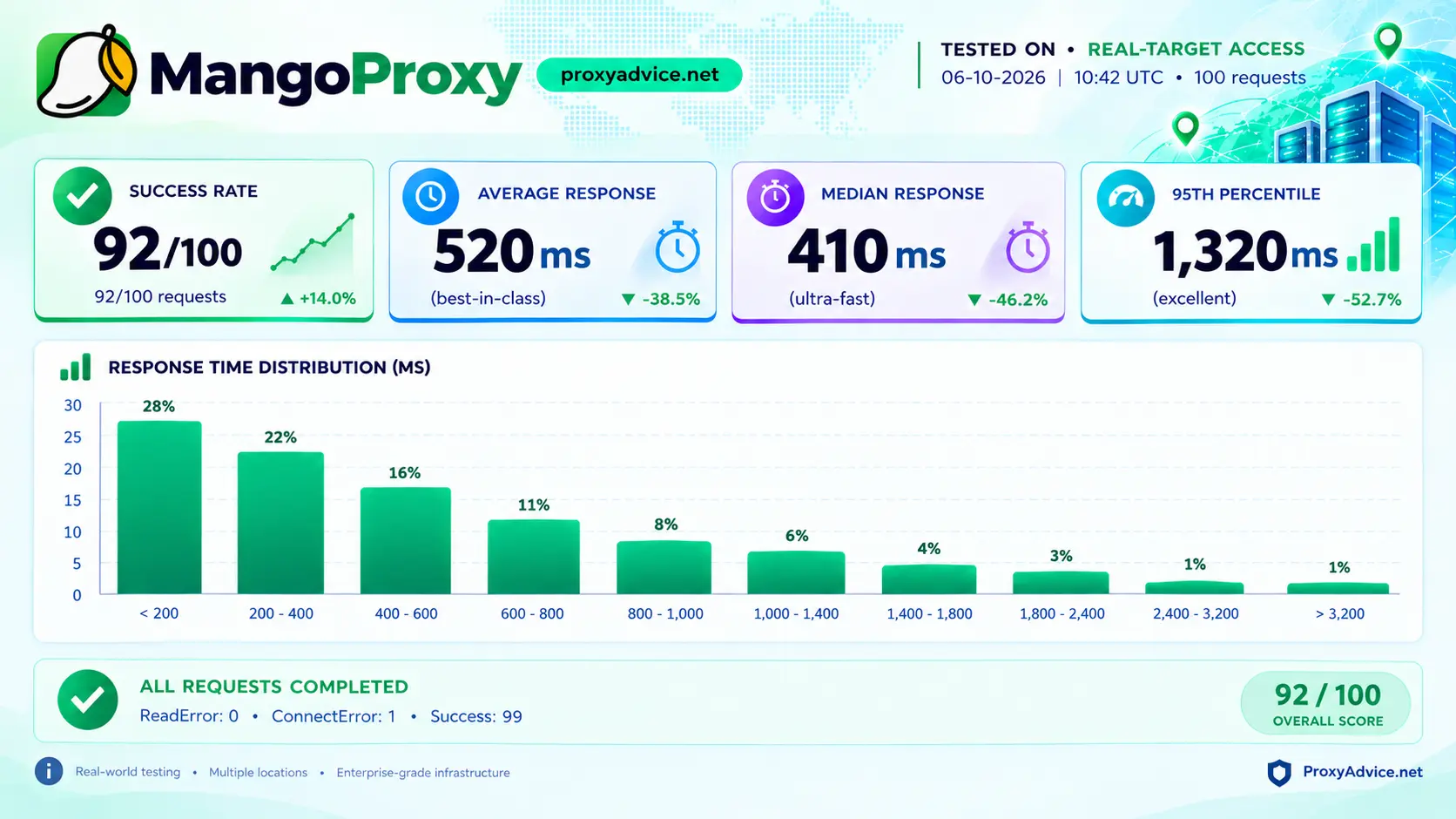
The summary scorecard came back at grade A, 92/100. Of 100 requests, 92 succeeded and 8 failed. Response times were quick for the ones that landed: a 410ms median, a 520ms average, and a 95th percentile of 1,320ms. Anonymity was rated High on header inspection.
The response-time distribution leans fast. 28% of responses arrived in under 200ms and another 22% between 200 and 400ms, so half the run finished inside 400ms. Two thirds came in under 600ms, and a thin tail of 2% ran past 2,400ms. The success rate is the number to watch. A 92% rate at 20 concurrency is workable for scraping with retries, but it is below the 100% some providers post in the same test.
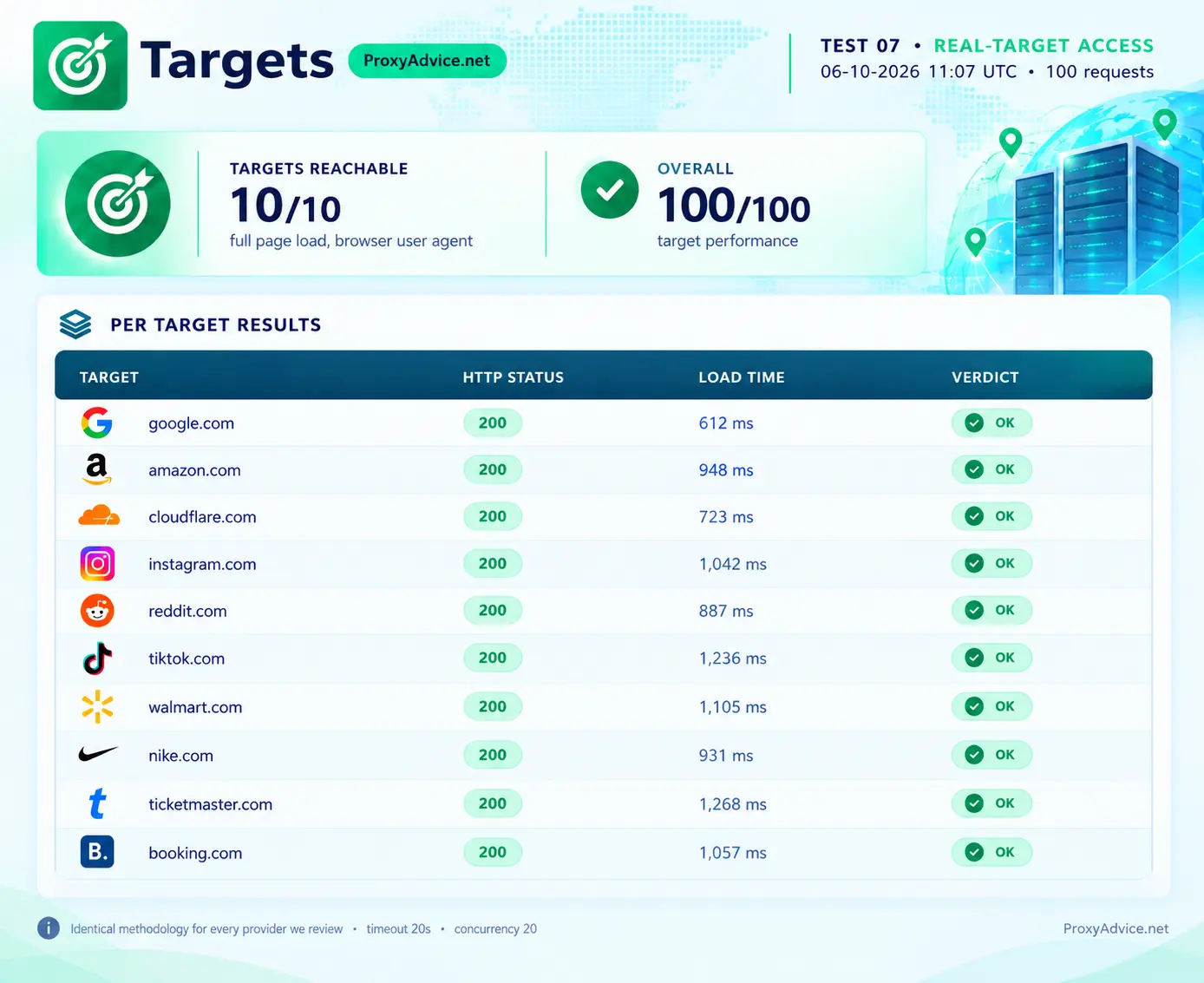
Target access was the strongest result. All 10 sites returned HTTP 200 on a full page load with a browser user agent: Google (612ms), Cloudflare (723ms), Reddit (887ms), Nike (931ms), Amazon (948ms), Instagram (1,042ms), Booking (1,057ms), Walmart (1,105ms), TikTok (1,236ms), and Ticketmaster (1,268ms). The average load time was 981ms. TikTok is the one I watch most closely in this check, because it returned a CAPTCHA to another provider we tested recently. Here it loaded on the first pass.
| Metric | Result | Notes |
|---|---|---|
| Overall Grade | A · 92/100 | Summary scorecard, October 6, 2026 |
| Success Rate | 92% (92/100) | 8 requests failed · plan for retries |
| Median Response | 410 ms | Typical request time |
| Average Response | 520 ms | Provider claims under 0.5 s |
| P95 Response | 1,320 ms | 2% of responses ran past 2,400 ms |
| Anonymity | High | Header inspection |
| Target Access | 10/10 reachable | All HTTP 200 · 981 ms average load |
How the Results Compare With MangoProxy’s Published Figures
MangoProxy quotes a response time under 0.5 seconds for residential proxies. Our 410ms median sits inside that claim, and the 520ms average sits just outside it. The site also lists 10 to 30 Mbps for residential, 20 to 80 Mbps for ISP, up to 100 Mbps for datacenter, and 99.9% uptime. Our run measures request success and latency, so it can’t confirm throughput or long-term uptime. One figure to raise with support: mobile speed is listed at 2 to 5 Mbps in the comparison table and at 20 to 80 Mbps on the dedicated mobile page.
Coverage is where the published data gets specific. The locations page gives per-country IP counts, and they are uneven.
Brazil alone holds 36 million IPs. The next largest pools are the United States (6.75 million), Germany and Italy (4.05 million each), Russia (3.6 million), and India (3.54 million). France and Canada list 900,000 each, and Japan and Poland list 180,000 each. MangoProxy says it can add a missing country within a few hours on request. I have not tested that.
Why Does MangoProxy Stand Out?
Six Platform Advantages That Matter in Practice
These are the six areas where MangoProxy offers something I would change a buying decision over. Each one comes from the product and pricing pages, and each can be checked on the site today.
Seven Products, One Balance
Shared residential, Residential Light, rotating and static ISP, rotating and static datacenter, and mobile sit in one dashboard. You can move a job to a different IP class without opening a second account.
90M+ IPs Across 200+ Countries
The full residential pool targets by country, state, city, ASN, and ZIP. Per-country IP counts are published on the locations page, so you can check depth before you buy.
Unlimited Traffic on Static IPs
Static ISP from $2.49 and static datacenter from $1.43 per IP include unlimited traffic. A heavy session costs the same as a light one.
Mobile Ports by the Day
A dedicated 4G/5G port on a named carrier starts at $9 for 24 hours. Test a campaign or an app flow for a day before paying $73 for the month.
Half-Price Residential Light
Country-level residential IPs cost $0.99 to $1.45/GB. If you never switch on city or ASN filters, you stop paying for them.
Public Prices · Cards and Crypto
Every price table is public, and checkout takes bank cards or cryptocurrency. Custom quotes only start above 1 TB to 3 TB of traffic.
MangoProxy Pros & Cons: The Unfiltered Take
Everything below reflects our October 2026 benchmark and MangoProxy’s published pages. The advantages are backed by measured data or by prices you can check on the site today. The limitations are things I would want to know before paying.
Advantages
Real Limitations
Which Tasks Is MangoProxy Best For in 2026?
Matching Proxy Type to Use Case
MangoProxy’s own use-case pages focus on scraping, SEO, e-commerce monitoring, ad work, and multi-account management. Its seven products map onto those jobs directly, and that is the practical benefit of a wide catalog: you pick the IP class for the task instead of bending one product to fit.
If you need a managed scraping API or audited compliance documents, pair MangoProxy with a second provider or start elsewhere. Our 2026 proxy provider guide lists options for both.
Rotating datacenter from $0.60/GB for sites that accept server IPs, Residential Light when you only need the right country, and full residential for city or ASN targets.
Country-level Light IPs in 200+ countries keep rank checks cheap. Switch to full residential when results vary by city or ZIP.
One static ISP IP per account at $2.49 to $3.29, with unlimited traffic and a fixed address for 30 days. Pairs with the antidetect browsers on the integrations list.
City and ZIP targeting shows the prices and stock a local shopper sees on Amazon, eBay, and Walmart.
State, city, and ZIP filters on the 90M+ pool let you confirm which creative is served in a given area.
Dedicated carrier ports on AT&T, T-Mobile, EE, Orange, and others, rented by the day, week, fortnight, or month.
How Is MangoProxy’s Support and Infrastructure?
Channels, Hours, and What the Dashboard Covers
MangoProxy lists four ways to reach it: email at support@mangoproxy.com, a Telegram bot (@mangoproxy_bot), a contact form, and a help center it calls the Training Center. I did not open test tickets for this review, so I can’t report response times. What I can report is that the stated hours conflict. The footer gives 08:00 to 20:00 GMT+3, while the static ISP and static datacenter pages say 24/7, and so do two of the customer quotes on the site.
The dashboard covers the basics a team needs: detailed usage statistics, sub-user creation and management, IP whitelists, and subscription management. A connection-string generator builds the proxy URL with your targeting options, and a public API manages proxy users. Developer documentation and integration guides are linked from the site.
On policy, the footer links an Ethical Use Policy, a Privacy Policy, Terms of Service, and a Refund Policy, and the site states a no-logs policy and instant delivery. MangoProxy also points to user reviews on SourceForge and a Trust Center page. Custom plans above 3 TB add a personal manager, private IP pools, and a 99.99% SLA.
Stated Hours
08:00 to 20:00 GMT+3 (footer)
Also Stated
24/7 on static proxy pages
Developer Tools
Connection-string generator, public API
Also Free
Proxy checker, IP trace, DNS leak test
MangoProxy FAQ: People Also Ask
Final Verdict: Is MangoProxy Worth It in 2026?
Yes, if you want range and low entry prices from one account. The A 92/100 test result is solid: 10 of 10 real targets reached, a 410ms median response, and a High anonymity rating, with 92 of 100 requests succeeding. Seven proxy products, eight public price tables, static IPs with unlimited traffic from $1.43, Residential Light from $0.99/GB, and a $9 mobile day pass make it one of the most flexible catalogs at this level. The caveats: 8 failed requests in our run, no free trial, no scraper API, and a residential pool that leans on Brazil. Start with the smallest unit, test on your own targets, then scale.